

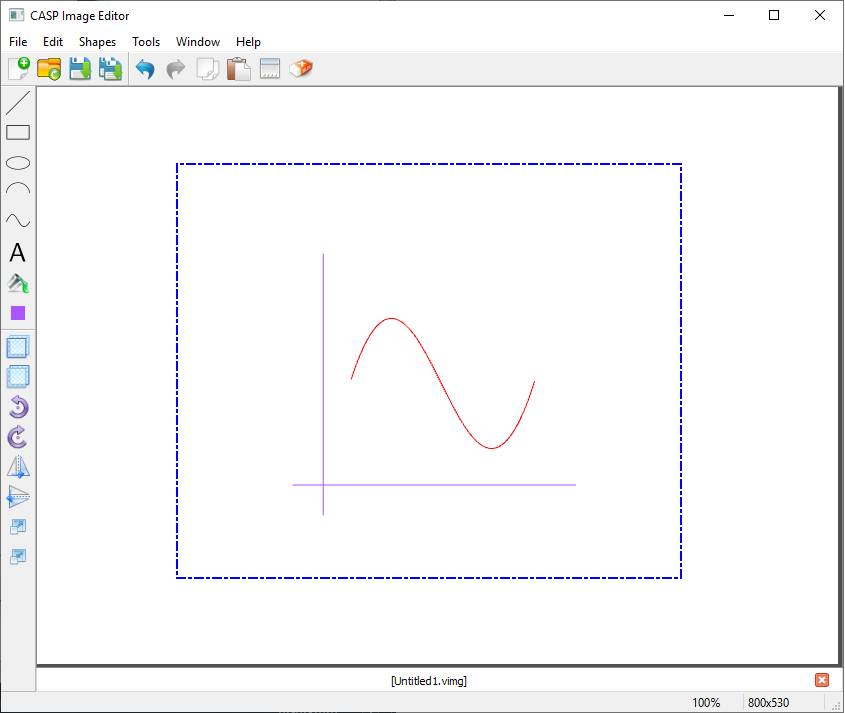
Image Editor allows user to create scalable vector graphics (SVG) images for graphical representation of blocks created with Block Editor. Multiple images can be edited as same time. Image Editor is accessible from Tools -> Block Tools -> Block Image Editor menu item in CASP main tool bar. Image Editor window is shown below
Shapes Tool Bar Image Tab Line Shape Bounding Rectangle Main Tool Bar Menu Bar Title Bar Image Window Spline Shape






§ Title Bar
Title bar at the top of the window displays application defined icon followed by a line of text indicating window title. The title bar makes it possible for the user to move the window using a mouse or other pointing device. At right hand corner, title bar contain three buttons to minimize, maximize or restore, and close the window.
§ Menu Bar
It is located below title bar and contains menu items for creating, editing and saving images.
§ Main Tool Bar
It is located below menu bar and contains tool buttons to perform basic operations on image files.
§ Shape Tool Bar
It is located at left side of the window and contains vertically arranged tool buttons to:
§ Draw various shape items such as line, rectangle, circle, spline, text etc.
§ Color shape items.
§ Rotate, scale, flip and bring to front etc.
§ Image Window
Main window where user draws required graphical image.
§ Image Tab
It is located below image window and contains tabs displaying image name.
§ Status Bar
It is located at bottom of the window and displays status information of application current state.