

Block parameters are used to alter the behavior of the block instances during modeling. Block parameters are termed as entities. Each entity is a combination of parameter field and value. Entities are grouped into entity group.
Add/Edit/Delete
Parameter Entity Entity
Field Entity
Group Add/Edit
Delete Parameter Entity Group


Add/Edit/Delete Entity Group
· Entity group can be modified with Add, Edit, Delete buttons as shown in above figure.
· HTML file displaying documentation of selected group can be specified with ‘Select File’ button.
Add/Edit/Delete Entity
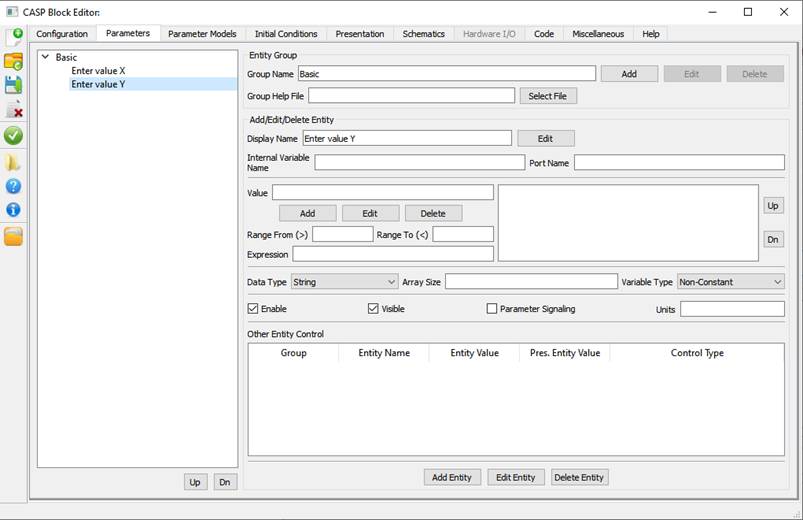
Parameter entities can be added under each entity group. After entity is added/updated Add Entity/ Edit Entity or Delete Entity button as applicable shall be pressed to update the changes. Following table describes various entity configuration options available
|
Display Name |
Entity name |
|
Internal Variable Name |
Internal variable name in C++ code. |
|
Port Name |
Enter one of blocks port name to which this entity is to be linked. This is used to establish internal link with ‘Signal BlockPara ’ block. This feature may be used to avoid block signal ports. |
|
Value |
Enter parameter value. If parameter support value array then individual values shall be separated by comma. |
|
Value Add/Edit/Delete Buttons |
These buttons allow multiple values for each parameter entity |
|
Range From (To) |
Range of value entered in value field |
|
Expression |
Write an expression which modifies entity value before inserting into block code. Letter ‘u’ shall be used to represent entity value. C syntax shall be followed in the expression. Eg. Expression u*100 multiplies entity value with 100 and inserts the resultant in the generated code. |
|
Data Type |
Select data type |
|
Array Size |
Set array size of Value field. |
|
Variable Type |
Select variable type |
|
Units |
Enter units of entity value |
|
Enable |
Check if parameter has to be enabled |
|
Visible |
Check if parameter has to be made visible |
|
Parameter Signalling |
This option is used to enable parameter entity link with ‘ Signal BlockPara ’ block. Entity port name shall not be empty if this is enabled. |
|
Other Entity Control |
Allows control (hide, set value etc.) of other parameter entities based on selected entity value. |