This section discusses about how to install/update CASP Python Libraries on your computer and other CASP Python related aspects that enable user to use CASP Python Libraries.
Getting Started
Step 1: Ensure Python is installed on the computer:
User can install standard Python from www.python.org or other distribution such as Anaconda from www.anaconda.com.
Step 2: Install CASP Python Libraries:
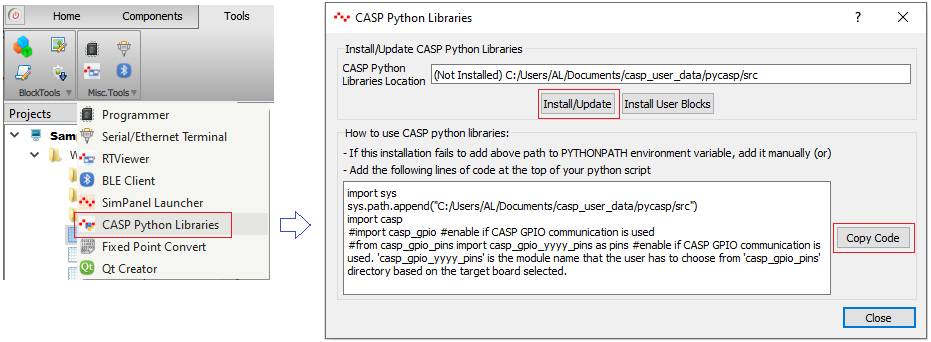
Open CASP main window. Select Tools > Misc. Tools > CASP Python Libraries to display a window as shown in below figure. Click on the ‘Install/Update’ button to install CASP Python Libraries. The CASP Python Libraries are installed at user’s documents directory under ‘casp_user_data/pycasp/src’ folder.
Step 3: Add the installed CASP Python Libraries path in your Python script:
The above installation tries to add CASP Python Libraries path to the PYTHONPATH environment variable. If it fails, user has to either add the installed path to PYTHONPATH environment variable manually or add the path in the Python script. To add the libraries path in your Python script, click on the ‘Copy Code’ button in the above window and paste the copied text at the top of your Python script. This enables CASP Python Libraries to be used in your script.
Step 4: Know about CASP Python Documentation:
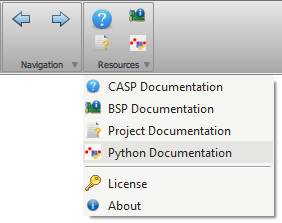
Detailed documentation about CASP Python Libraries can be accessed by clicking Resources > Python Documentation menu item in CASP main window. User can also refer examples provided in ‘casp_user_data/pycasp/examples’ directory in user’s documents folder.
Step 5: Know about CASP Python Examples Paths:
CASP Python examples are available in following locations
· ‘casp_user_data/pycasp/examples’ directory in user’s documents directory.
· ‘support/examples/casp_rgpio_examples’ directory in CASP installed directory. The example projects in this directory consist of Python scripts that use CASP Remote GPIO communication protocol.
· ‘support/examples/casp_gpio_examples’ directory in CASP installed directory. The example projects in this directory consist of Python scripts that use CASP GPIO communication protocol.
· ‘support/examples/casp_udio_examples’ directory in CASP installed directory. The example projects in this directory consist of Python scripts that use CASP UDIO communication protocol.
· ‘support/examples’ directory in CASP installed directory. Most of the example projects in this directory consist of Python scripts as an alternate method to build the project models.
Step 6: Viewing Individual Block Python Script:
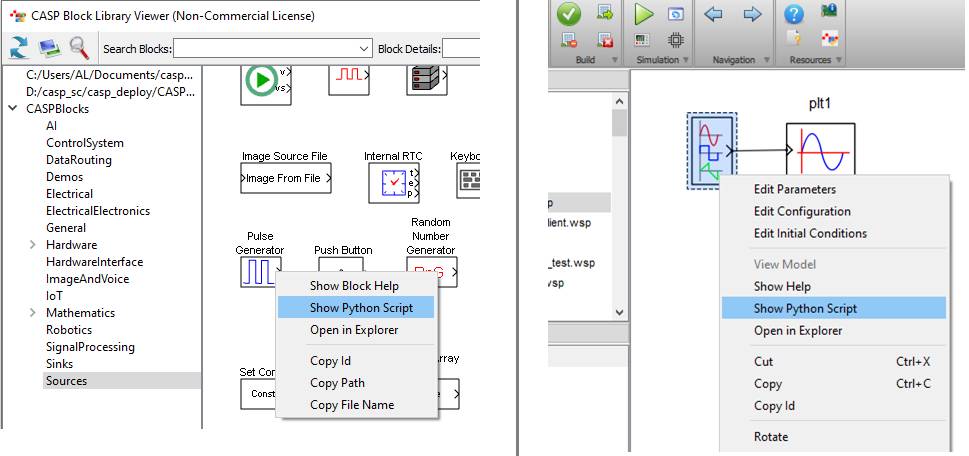
· CASP blocks can be accessible as modules from your Python script. Documentation on how to use the block in a Python script can be viewed by right clicking on the block (either from Model Editor or from Block Viewer window) and selecting ‘Show Python Script’, as shown in below figures.