

CASP supports embedding Python script in a CASP block using Python C-API.
· This method is suitable for cases where a piece of Python script is to be used or tested in a CASP model.
· Can be executed only on platforms that support embedded Python.
· Multi-threading is not supported within Python script.
· 3rd party Python packages such as Numpy, Pytorch and many more are supported.
Before going into details user is recommended to go through python documentation on how to embed python script in C/C++ (http://docs.python.org/c-api/). By using the C-API that is listed in the python web site user can create his/her own interface based on the data types and format. However, CASP provides ready to use C++ wrapper classes to make the interface easier. These wrapper classes source files are located in /source/src_py directory. The procedure for using existing python code is as follows
· Install python from www.python.org or from www.anaconda.com.
· Additional python packages such as ‘NumPy’ are also required to be installed for proper functioning.
· Ensure, the python directory paths are added to PYTHONPATH and system PATH.
· In CASP, Python paths shall be configured before using it. Python paths can be configured globally as well as for each target as follows. Python paths configured for each target are used for embedding Python code in C/C++. Globally configured Python paths are used for special purposes internal to CASP.
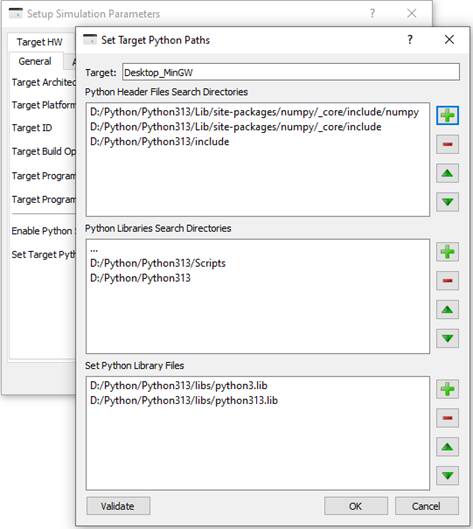
§ To configure Python paths for the selected target, click on ‘Set Target Python Paths’ in ‘Setup Simulation Parameters’ dialog box. This opens up a window where user can add valid Python paths. Before closing the window user can click on ‘Validate’ button to validate the paths.
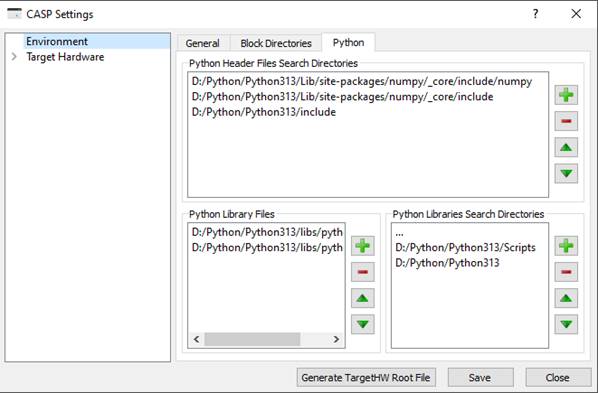
§ To configure global Python paths, add python directory paths to CASP environment as shown below. The user interface can be accessed from Start->Settings.
· After Python paths are properly configured, create a primary block as described in Create Primary Blocks section. Select ‘Embeds Python Code’ option under ‘Configuration->Code-Basic->Embeds other language code’. Create block ports matching with the number and type of arguments used in the python code. And finally, generate the block template code to complete the block creation process.
· Modify the generated template code suitably. Call python C-APIs from the template code. See Tutorial-7 for more information.
· Create a CASP model that uses the python block created using above steps.
· Finally, enable python support in Setup Simulation Parameters->TargetHW before building and executing CASP model.