This section discusses how to exchange UDIO data with the target micro-controller board (connected to the host computer through serial port, WiFi, Ethernet etc.) using a Python script. For details for CASP UDIO communication protocol please refer to this section.
Before starting with the Python script, the target micro-controller board should be programmed with logic that supports UDIO communication protocol. Following are some of the note worthy points when using Python for exchanging data with the target using UDIO protocol
· It extends the capabilities of the host computer. The target micro-controller board will be now virtually part of the host computer. The entire logic is divided in to two sections. One section that is developed using C/C++ or CASP blocks and runs on target hardware along with UDIO blocks/code. Second section that is part of host computer and developed using Python.
· The Python script runs on host computer using standard Python libraries. Any 3rd party Python libraries (such as Numpy, Pytorch etc.) can be used.
· Any target micro-controller board supported by CASP can be used.
· Low latency communication between that target board and the host computer.
· Multiple communication interfaces are possible (Serial, Ethernet, WiFi) etc.
· When using WiFi the target board need not be physical connected to the host computer.
Getting Started
Step 1: Ensure CASP Python Libraries are installed as described in this section.
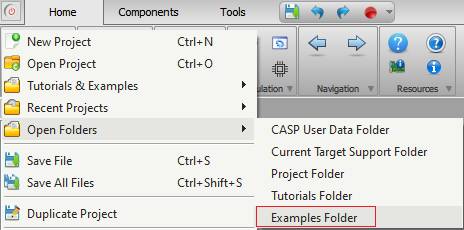
Step 2: Refer UDIO examples from ‘support/examples/casp_udio_examples’ folder. User can access the ‘examples‘ folder by selecting the ‘Examples Folder’ menu item from CASP main menu as shown below.
Step 3: Create a new Python script file or open an existing one in any directory of your choice. Add CASP Python Libraries installation path at the top of your Python script file (if required). The details on how to add the path in your script is given here.
Step 4: Import the namespace ‘casp_udio’ to your Python script with following code
import casp_udio
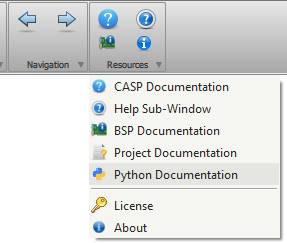
Step 5: Use the functions from ‘casp_udio’ namespace in your code to communicate with the target. Detailed documentation about these libraries can be accessed by clicking Resources > Python Documentation menu item in CASP main window.
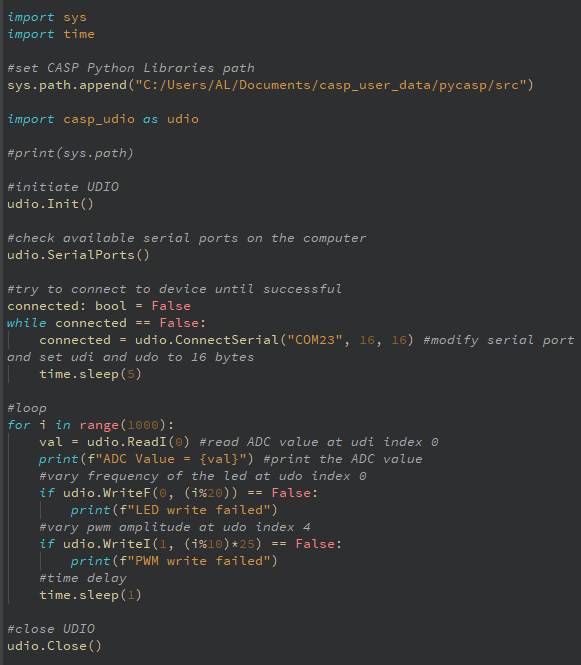
Example: Sample code snippet to read ADC value from Arduino Uno and control the frequency of on-board LED and PWM pin-3 is shown below. As a prerequisite, Arduino Uno board should be programmed with CASP model from ‘/CASP/support/examples/casp_udio_examples/udio_led_control_arduino_uno/control_led_udio_target_uno’ directory before trying this example.