

CASP Programmer allows user to program supported target boards with selected binary or hex file. CASP programmer can be accessed from ‘Tools’ menu as shown in below figure
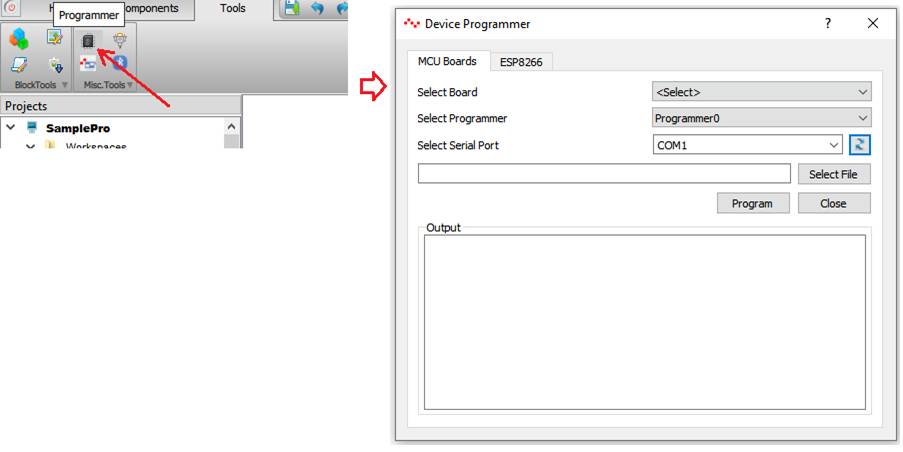
Once the programmer window is visible, first select ‘Boards Type’. In most cases this value shall be set to ‘All Boards’ except for some cases where the current selected target supports RGPIO and user wants to the program the board with selected RGPIO pins target binary.
For cases where board type selected is ‘All Boards’, following steps shall be followed to program the board
· ‘Select Board’ to be programmed from the list box. The list box will show all target boards current installed.
· ‘Select Programmer’, in most cases it is Programmer0. Refer selected board BSP documentation for further details on this option.
· Select ‘Serial Port’ to which the board is connected. Click Refresh to refresh the list.
· Browse to select the binary or hex file.
· Click on Program button to program the board.
· Status of the programming process will be displayed in the ‘Output’ window.
For cases where board type selected is ‘RGPIO Supported Boards’, following steps shall be followed to program the RGPIO target board
· ‘Select Board’ to be programmed from the list box. Now the list box shows only supported boards based on selected RGPIO pins file.
· ‘Select Programmer’, in most cases it is Programmer0. Refer selected board BSP documentation for further details on this option.
· Select ‘Serial Port’ to which the board is connected. Click Refresh to refresh the list.
· Select the suitable binary or hex file from the list (the list will be filled automatically with supported targets based on the RGPIO pins file selected). No need to browse for the binary or hex file.
· Click on Program button to program the board.
· Status of the programming process will be displayed in the ‘Output’ window.