

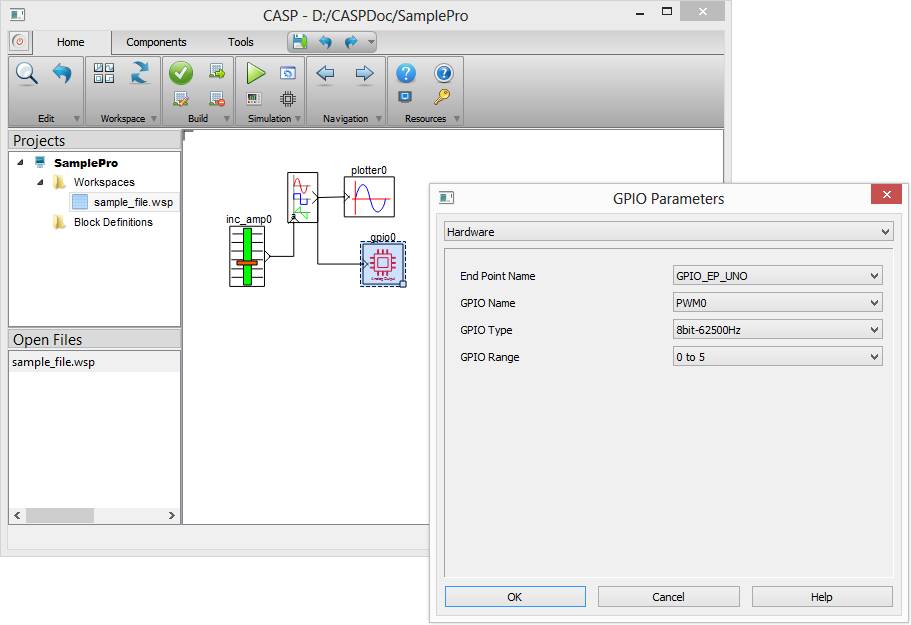
Connected hardware with input output such as digital inputs (DI), digital outputs (DO), ADC inputs and PWM outputs can be used in model with the help of GPIO block. GPIO block knows the presence of connected hardware only if connected hardware end point input output (EPIO) model is imported and properly configured. The procedure to import EPIO model is described here. After importing EPIO model, the EPIO parameters such as End Point Name, GPIO Name, GPIO Type and GPIO Range etc. are directly visible in GPIO block as shown below.
Points to noted while simulating with GPIO Blocks
· User shall properly configure GPIO blocks with EPIOs.
· GPIO Simulation Mode shall be suitably chosen to properly synchronize with connected hardware. Simulation Time Step shall be set above cycle time if ‘Sync. Time Step‘ option is chosen.