

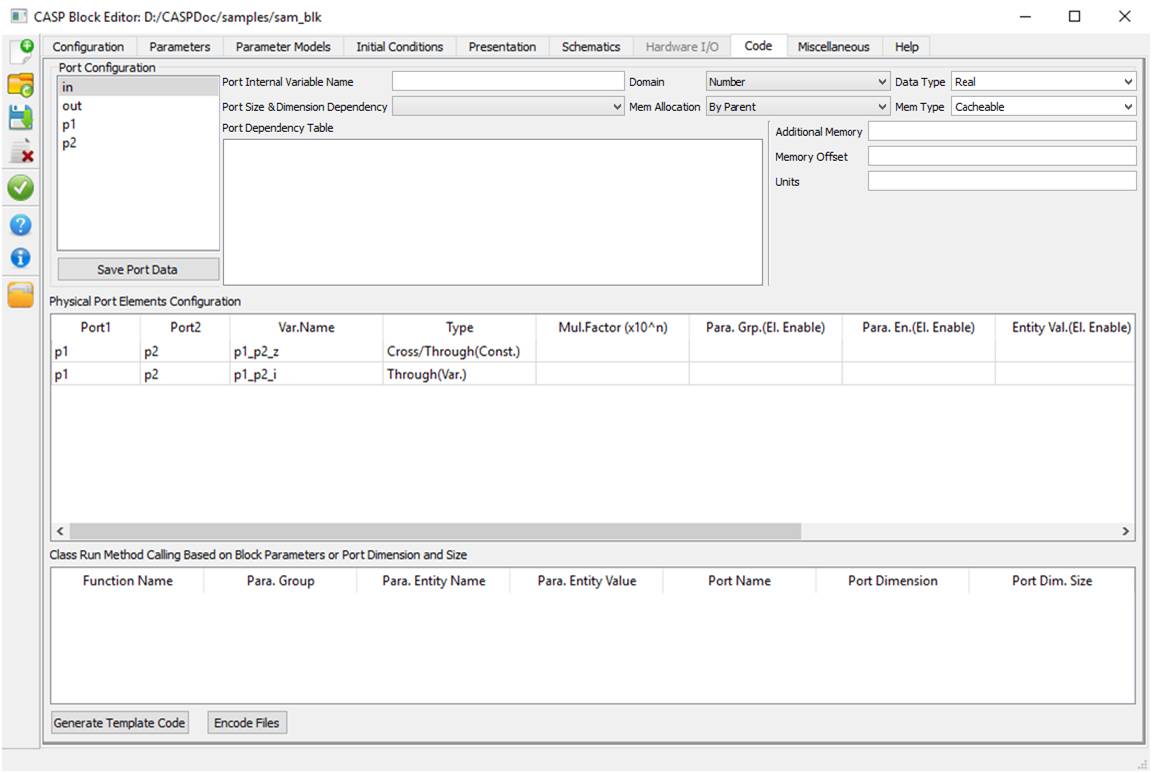
Code configuration is used to configure block port parameters such as port dimensions, data size, data type and many others. The interface is described below
|
Parameter |
Sub Parameter |
Description |
Default Value |
|
Port Configuration |
- |
Select each port from list box and configure following parameters. Press Save Port Data to save configuration. |
- |
|
Port Internal Variable Name |
Enter internal (C++ code) port variable name representing selected port. |
Same as port name |
|
|
Domain |
Select relevant domain |
Number |
|
|
Data Type |
Select relevant data type. If Real or Integer is selected then actual data type is decided based on arithmetic precision selected during simulation parameter setup. |
Real |
|
|
Port Size & Dimension Dependency |
Always select ‘Script’. Other options are reserved. |
Script |
|
|
Memory Allocation |
Select among a) By Parent: Port memory is allocated by parent block b) By Block: Port memory shall be allocated by block c) By Block (User Overidable): This option is reserved |
By Parent |
|
|
Mem Type |
Port memory type. Non-cacheable indicates volatile type. |
Cacheable |
|
|
Port Dependency Table |
Double click in each dimension row and enter non-zero size as required. This indicates port data size for each dimension. Leave un-used rows as empty. |
- |
|
|
Additional Memory |
Reserved |
- |
|
|
Memory Offset |
Reserved |
- |
|
|
Units |
Enter port units |
- |
|
|
Physical Port Elements Configuration |
- |
This interface is used to represent one of more physical elements between two selected ports. Right click inside the window (shown in above figure) and select ‘Add Row’. Double click in each column of added row and configure as described below. |
- |
|
Port1, Port2 |
Select physical ports in Port1, Port2 columns. Port1, Port2 of same row shall be unique. |
- |
|
|
Var.Name |
Enter suitable internal variable name representing the element |
<Port1>_<Port2> |
|
|
Type |
Select from available elements |
- |
|
|
Mul.Factor |
Element value pre-multiplication factor |
- |
|
|
Enable element based on Block Parameter Entity |
Select Para.Grp.(El. Enable) -> Para.En.(El.Enable) -> Entity Val.(El Enable) to enable element based on selected parameter entity |
- |
|
|
Set element value based on Block Parameter Entity |
Select Para.Grp.(El. Val) -> Para.En.(El.Val) -> Entity Val.(El Val) to set element value based on selected parameter entity value |
- |
|
|
Class Run Method Calling Base on Block Parameters or Port Dimension and Size |
- |
This is under development |
- |
|
Generate Template Code |
- |
Generates template code based on configuration |
- |
|
Encode Files |
- |
Used to encode source files. Header files are not encoded. |
- |