

Getting Started
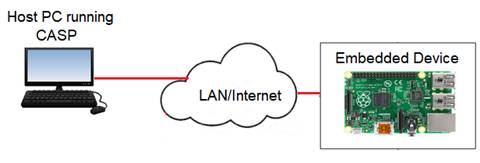
Step-1: Select a suitable target board or computer that supports CASP remote build feature. Ensure host and the target are connected on the network and can communicate each other. Use ping tool to check the connection.
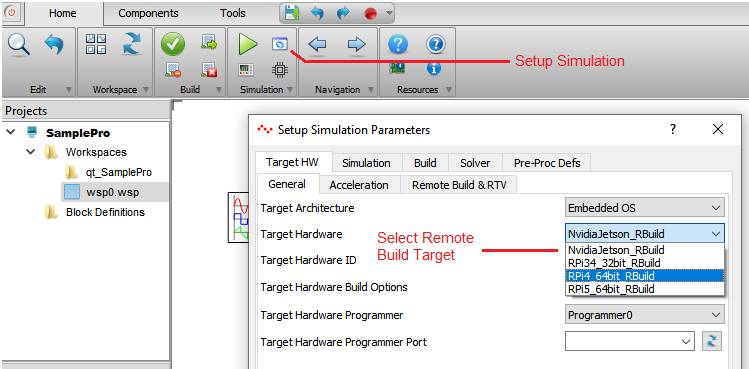
Step-2: On the host PC start CASP, create or open a project. Click on ‘Simulation->Setup Simulation’ icon and select the remote build target from the dialog box (as shown in below figure).
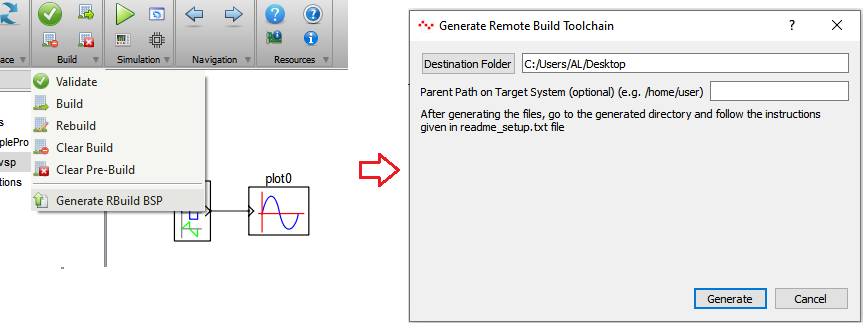
Step-3: Select ‘Build->Generate RBuild BSP’. From the dialog window select a suitable destination folder and click on ‘Generate’ button to create a directory in the ‘Destination Folder’ selected by the user. The directory contains remote build target’s BSP and toolchain files.
Step-4: Copy the folder to the target’s user directory (better to zip the folder, copy the zip file to target’s user directory and unzip the file). Open the ‘readme_setup.txt’ file from the directory and follow the steps mentioned in the file to install BSP and required dependencies. User may have to connect the target to the internet to download required dependencies.